


FlowClone

Product case study by Andre Romero-Carey

FlowClone: hold a key, speak, and your words appear where you’re typing.

A native macOS dictation app I designed and built. Speech recognition runs on the Mac itself, and the cleaned-up text is pasted into whatever app you’re using.

My role
Product owner and builder
Built
Aug–Sep 2026
Stack
Swift, AppKit, SwiftUI, Core ML
FlowClone's main window: a sidebar with Dictation, Draft, Dictionary, Snippets and Transforms, a Raw, Clean and Prompt mode switch, and a list of recent dictations such as “Can you move the design review to Thursday afternoon and send the agenda beforehand?”
The main window, rendered from the app with sample data.

One dictation, step by step

Interactive walkthrough. Every image is a real render of the native app, captured offscreen on test data. It is not a screen recording.

fnheld down
FlowClone's recording pill, listening: a rounded capsule with five small blue dots.Recording pill, rendered by the app
Hold fn (or Control + Option) in any app. A small pill appears at the bottom of the screen, and the app you’re typing in keeps focus.

“The committee reviewed the quarterly financial statements and concluded that projected revenue growth would remain broadly consistent with earlier guidance.”

Synthesized test passage, 7.8 seconds
The recording pill while speaking: five blue bars of different heights.Recording pill, rendered by the app
Speak normally; the bars follow your voice. This walkthrough uses a synthesized test passage rather than a real person’s dictation.
fnreleased: transcription and cleanup run on the Mac
The pill while processing: a ring of grey dots.Recording pill, rendered by the app
Let go of the key. An on-device speech model (NVIDIA’s Parakeet) transcribes the audio, then FlowClone tidies it: filler words, your custom vocabulary, spoken corrections such as “I mean”, and formatting.
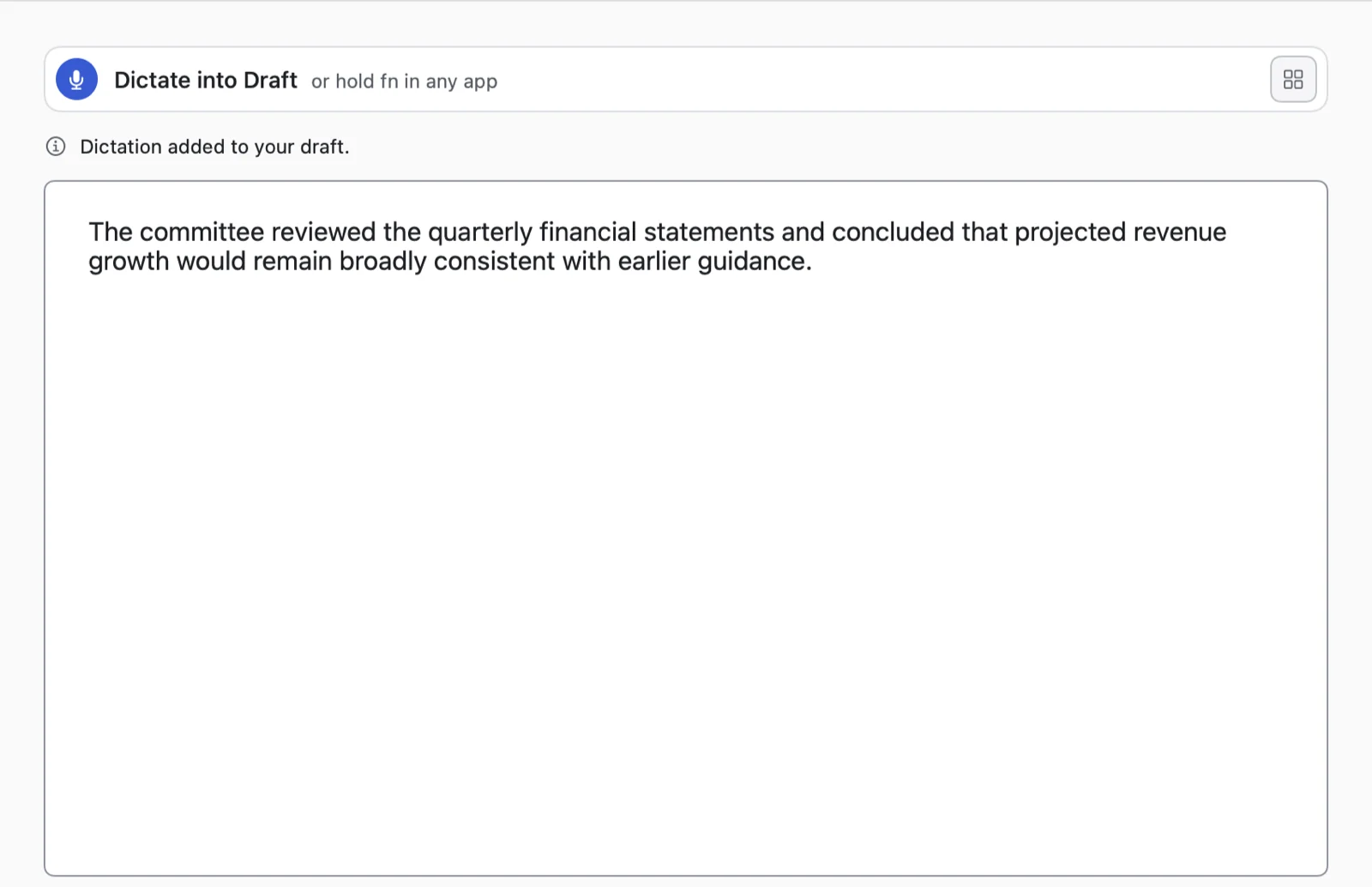
FlowClone's Draft view containing the transcribed test passage, word for word, with “Dictation added to your draft” above it and a 20-word count below.
The text is pasted at your cursor, and your previous clipboard is put back. This is the app’s actual output for the test passage, word for word, shown in FlowClone’s own Draft view because the offscreen test session isn’t allowed to paste into other apps.
The Dictation details window: Raw, Clean and Final tabs, the target app (Visual Studio Code), and a yellow badge reading “Insertion unverified — check the app before pasting again”.
Each dictation is kept on the Mac with its raw and cleaned text, the app it went to, and whether the paste was confirmed. When a paste can’t be confirmed, FlowClone says so, and the text can be recovered instead of retyped. (Sample data.)
Read the walkthrough as text
  1. Hold the key. Hold fn (or Control + Option) in any app. A small pill appears at the bottom of the screen; the app you’re typing in keeps focus.
  2. Speak. The pill’s bars follow your voice. Test passage: “The committee reviewed the quarterly financial statements and concluded that projected revenue growth would remain broadly consistent with earlier guidance.”
  3. Release. An on-device speech model transcribes the audio, and rule-based cleanup handles filler words, custom vocabulary, spoken corrections and formatting.
  4. Text arrives. The text is pasted at the cursor and the previous clipboard is restored. In this capture the app produced the test passage word for word; it is shown in FlowClone’s Draft view because the test session can’t paste into other apps.
  5. Check the record. History keeps the raw, cleaned and final text, the target app, and whether the paste was confirmed.

Why I built it

Talking is usually faster than typing. I wanted Wispr Flow–style dictation (hold a key, talk, get clean text) that runs entirely on my own Mac, with no subscription and no audio leaving the machine.

The bar was simple: fast enough that I’d reach for it all day, and trustworthy enough that it never quietly loses what I said.

What I did

I led the project end to end. I researched how existing dictation tools work, wrote the product plan, and set the constraints: on-device, fast, and careful with the apps it pastes into. I then directed AI coding agents, mainly Claude Code with Codex for some work, to build it in Swift.

I reviewed each change against automated tests and my own daily use, and I made the product calls: what to cut, what to keep, and when a result wasn’t good enough.

Timeline
Aug 2 – Sep 28, 2026
Codebase
74 Swift files, about 23,000 lines
Automated tests
247

What happens between the key and the text

  1. Listen for the key

    A system-wide keyboard listener notices fn or Control + Option in any app.

  2. Capture

    The microphone audio is converted to the 16 kHz format the speech model expects.

  3. Recognize

    Parakeet, an NVIDIA speech model, runs locally through Apple’s Core ML.

  4. Clean up

    Rules remove fillers, apply your dictionary and spoken corrections, and format lists. No AI model on this path.

  5. Paste

    The text goes on the clipboard, FlowClone presses ⌘V, then restores whatever you had copied.

Nothing you say is sent to a server. The app’s only network activity is the one-time speech-model download and update checks. Optional features that rewrite text use Apple’s on-device Foundation Models.

Product decisions

Cut the AI rewrite from the default path

Early versions ran every dictation through an on-device language model to polish the wording. My own history showed that in 19 of 136 comparable dictations (14%) the rewrite changed more than punctuation or capitalization, yet it added about a second of waiting every time. Speed mattered more, so I removed it.

1.21 swith the rewrite
421 dictations, Sep 4–22
0.28 swithout it
48 dictations, Sep 22–28

Median time from releasing the key to FlowClone sending the paste, from the app’s own timing log in my daily use. The two periods contain different sentences, so this is an observed change, not a controlled test. The trade-off: the rewrite had been adding some missing question marks, so I’m evaluating a rule-based fix that adds no delay.

Keep the model that works, not the newest one

I trialed a newer streaming speech model (NVIDIA Nemotron). In my own use its transcripts were noticeably worse, so I switched back to Parakeet the same afternoon and left the new code switched off.

Make a failed paste visible

Pasting into someone else’s app can fail without any error. FlowClone checks the result where macOS allows it and labels each dictation as confirmed, unverified or not inserted, so I can recover the text instead of retyping it.

Development challenge

The paste that sometimes arrived empty

The symptom. Now and then, a dictation into one desktop app arrived as nothing at all, yet pressing ⌘V by hand pasted it perfectly. The app was built on Electron, the framework behind apps like Slack and VS Code.

The cause. With the “Keep last dictation on clipboard” setting on, FlowClone rewrote the clipboard right after the paste began. Electron’s Chromium engine returns empty text if the clipboard changes while it is still reading. A timing race, and only with that setting on.

The fix. FlowClone now completes the clipboard item that’s already there instead of replacing it, so the reading app never sees a change. No retries and no added delay.

The proof. Five new tests against the real macOS clipboard, plus a hidden Electron window that reproduced the empty paste before the fix and received the exact text after it. The fix has been in my installed copy since September 23, and I’m confirming it through everyday use.

Before

  1. Paste starts
  2. Clipboard replaced
  3. App reads: empty

After

  1. Paste starts
  2. Same item completed
  3. App reads: full text

Measured results, and their limits

0.28 s

Median time from releasing the key to the paste being sent, in my daily use.

48 dictations, Sep 22–28, 2026; 90th percentile 0.35 s. Real use on one Mac. It doesn’t include the moment the other app draws the text.

67 ms

To transcribe a 7.8-second test clip once the model is loaded.

Benchmark, median of 3 runs, Apple M4 Max, Sep 28, 2026. A synthetic clip, so it says nothing about accuracy on real speech.

247

Automated tests covering cleanup rules, paste safety, clipboard handling, history and updates.

Count in the current source, Sep 29, 2026.